
Download No More Google – free Google alternatives, secure list of tools
Overview of No More Google
In a digital world where Google dominates search, email, cloud storage, and even the browser market, many users start to wonder if there are viable alternatives that respect privacy, offer unique features, or simply provide a refreshing change of scenery. No More Google steps in as a curated hub that aggregates crowd‑sourced alternatives for virtually every Google service you can think of. Whether you are looking for a privacy‑first search engine, a lightweight email client, or a different web browser, this website presents a well‑organized, easy‑to‑navigate list that makes discovery effortless.
The platform’s philosophy is built around community participation. Every alternative is submitted by a user, voted on with a simple thumbs‑up, and can be commented on for further clarification. This democratic approach ensures that the most popular, reliable, and innovative tools rise to the top, while newer or niche options still receive visibility. The “Add alternative” button, placed conspicuously in the upper‑right corner, invites users to contribute their own discoveries, making the database a living document that evolves alongside the tech landscape.
What sets No More Google apart from generic “list” pages is its clean interface and thoughtful categorisation. Services are grouped under clear headings—Search Engines, Browsers, Cloud Storage, Productivity Suites, and more—so you can jump straight to the area you’re interested in. Each entry includes a brief description, a link to the official site, and the community rating, allowing you to make an informed decision in seconds. Whether you’re a privacy advocate, a developer seeking open‑source tools, or simply a curious user ready to explore beyond the Google ecosystem, No More Google offers a reliable launchpad for your next software adventure.
Key Features & Highlights
- Extensive Category Coverage: Over 150 alternatives spanning search, browsing, email, cloud storage, maps, video platforms, and productivity tools.
- Community Voting System: Each alternative can be up‑voted, providing a transparent popularity metric that reflects real‑world usage.
- User‑Submitted Suggestions: Anyone can propose a new service via the “Add alternative” button, ensuring the list stays current.
- Detailed Descriptions: Concise yet informative blurbs accompany each entry, highlighting core features, privacy policies, and platform availability.
- Responsive Design: Optimised for desktop, tablet, and mobile browsers, so you can browse alternatives on any device.
- Search & Filter Tools: Quick search bar and filter options (free vs. paid, open‑source, cross‑platform) let you narrow down choices efficiently.
- Secure Links: All external URLs are verified for HTTPS, protecting you from malicious redirects.
- Regular Updates: The site’s admin team reviews submissions weekly, removing dead links and adding emerging services.
- Open‑Source Friendly: Special tags highlight open‑source alternatives for developers and tech enthusiasts.
- Multi‑Language Support: Interface available in English, Spanish, French, and German, broadening accessibility.
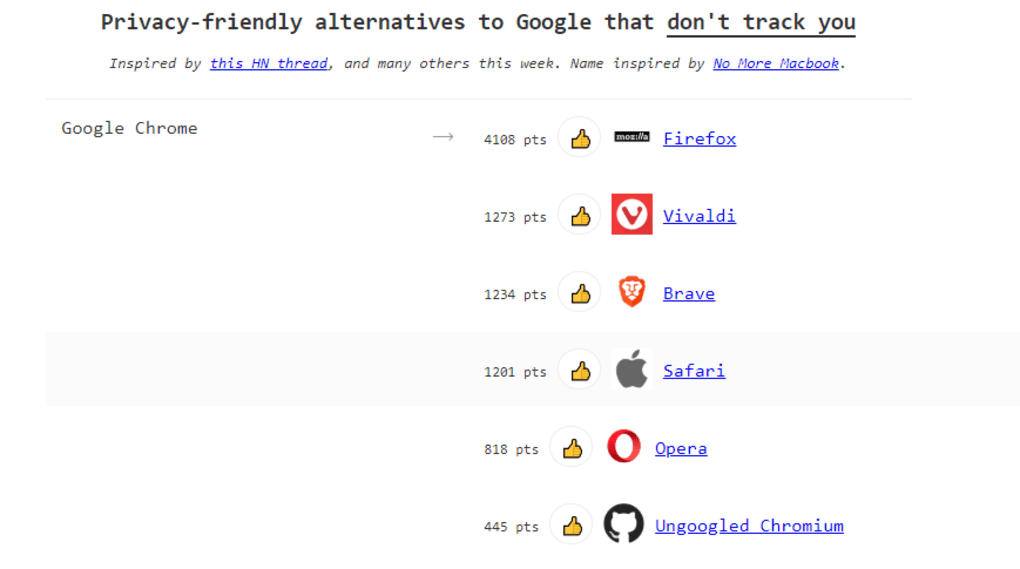
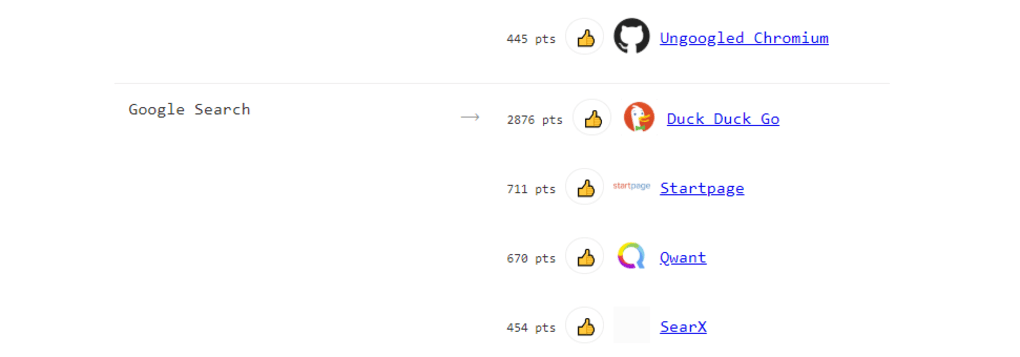
These features combine to create a user‑centric experience that feels less like a static directory and more like a collaborative knowledge base. The voting mechanism is especially powerful because it surfaces the most trusted tools without requiring you to read endless reviews. For example, when looking for a Chrome alternative, you’ll see Mozilla Firefox, Microsoft Edge, Brave, and Opera rise to the top, each with a brief note on performance, privacy, and extension compatibility. Similarly, the “Search Engines” category highlights privacy‑focused options such as DuckDuckGo, Startpage, and Qwant, alongside specialized engines like WolframAlpha for computational queries.
The platform also shines in its commitment to security. Every link is automatically checked for SSL encryption, and the site’s own privacy policy assures that no personal data is collected when you simply browse the list. If you decide to submit a new alternative, the form is protected by Google reCAPTCHA, reducing spam and ensuring a clean database. Overall, No More Google delivers a secure, community‑driven, and feature‑rich environment for anyone ready to expand their software toolkit.
Installation & Usage Guide
Getting Started with the Website
Accessing No More Google is as simple as opening any modern web browser—Chrome, Firefox, Safari, or Edge. Navigate to nomoregoogle.com and you’ll be greeted by the home page featuring the main categories. No registration is required to browse the list, making it instantly usable for casual visitors. If you wish to vote on an alternative or submit a new entry, a quick sign‑up using your email address or social login is prompted; this process takes less than a minute.
Exploring Alternatives
To find a replacement for a specific Google product, click on the relevant category. For instance, selecting “Browsers” opens a grid of options, each with an icon, name, short description, and vote count. Use the search bar at the top of the page to type keywords like “privacy browser” or “offline email client.” Filters on the left allow you to narrow results by price (free vs. paid), platform (Windows, macOS, Linux, Android, iOS), and licensing (open‑source vs. proprietary). Clicking on an alternative expands a modal window with deeper details, including screenshots, key features, and a direct link to the official download page.
Voting and Contributing
Once you’ve tried an alternative and formed an opinion, you can support it by clicking the thumbs‑up icon next to its name. Votes are tallied in real time and reflected on the ranking. If you encounter an error, broken link, or simply want to suggest a new tool that isn’t listed, locate the “Add alternative” button in the top‑right corner.
The submission form asks for the service name, category, official URL, a brief description, and optional tags (e.g., “privacy‑first,” “open‑source”). After you submit, the entry enters a moderation queue; the admin team verifies the information before it appears publicly. This crowdsourced model ensures the list stays fresh and trustworthy.
Downloading & Setting Up Alternatives
While No More Google itself is a web‑based resource and does not require installation, the alternatives it points to will. For desktop applications (browsers, office suites, VPN clients), clicking the provided download link redirects you to the official site where you can download an installer for Windows, macOS, or Linux. Follow the standard installation prompts: accept the license agreement, choose an installation folder, and complete the setup. Mobile apps (Android or iOS) redirect you to the Google Play Store or Apple App Store, respectively. In most cases, the installation process mirrors that of mainstream Google services, ensuring a low learning curve.
After installation, you can return to No More Google to rate your experience, helping future users make informed choices. The site also offers a “Bookmark” feature (available after creating an account) that lets you save favorite alternatives for quick reference. By combining an intuitive browsing experience with community‑driven validation, No More Google simplifies the journey from discovery to deployment.
Compatibility & System Requirements
Because No More Google is a web application, it runs on any device that supports modern browsers. The site has been tested on the latest versions of Chrome, Firefox, Safari, Edge, and Opera, and it degrades gracefully on older browsers (Internet Explorer 11 and earlier) with a simplified layout. This cross‑platform compatibility ensures that users on Windows, macOS, Linux, Android, or iOS can access the database without any additional software.
The alternatives listed within the platform, however, have varied system requirements depending on their category. Below is a quick compatibility matrix to help you gauge which options will run on your hardware:
- Web Browsers: Most modern browsers support Windows 10/11, macOS 10.14+, Linux (Ubuntu 18.04+, Fedora 30+), Android 8.0+, and iOS 13+. Examples include Firefox, Brave, and Vivaldi.
- Search Engines: As web services, they are universally accessible via any browser, but some specialized engines (e.g., WolframAlpha) may require JavaScript enabled.
- Email Clients: Desktop clients like Thunderbird need Windows 7+, macOS 10.12+, or major Linux distributions. Mobile clients such as ProtonMail are available on Android 6.0+ and iOS 11+.
- Cloud Storage: Services like Nextcloud offer web access plus native apps for Windows, macOS, Linux, Android, and iOS. Minimum OS versions mirror those of the respective desktop/mobile apps.
- Productivity Suites: LibreOffice runs on Windows 7+, macOS 10.10+, Linux; OnlyOffice supports Windows 10+, macOS 10.13+, Linux, plus Android/iOS for mobile editing.
For users with older hardware, the site highlights “lightweight” alternatives in each category. For example, the “Lightweight Browsers” filter showcases browsers like Midori and Falkon, which consume minimal RAM and CPU resources. Similarly, “Minimalist Email Clients” points to applications such as Mailspring Lite.
Security is also a consideration: all external links are verified to use HTTPS, and the platform itself enforces TLS 1.2+ encryption, protecting data in transit. No personal data is stored unless you create an account for voting or bookmarking, and even then, passwords are salted and hashed according to industry best practices. In short, No More Google offers broad compatibility, clear system requirement guidance, and robust security for a seamless experience across devices.
Pros and Cons
What Users Love About No More Google
- Comprehensive Coverage: Over 150 alternatives across many Google services.
- Community‑Driven Rankings: Votes give a quick visual cue of reliability.
- Easy Contribution: Simple form to suggest new tools.
- Clean, Responsive Design: Works well on desktop and mobile.
- Secure Linking: All external URLs use HTTPS.
- Free to Use: No subscription or hidden fees.
- Filter & Search Functionality: Quickly narrow down options.
- Multi‑Language Interface: Supports several major languages.
Areas for Improvement
- Limited Advanced Filters: No granular filter for privacy certifications.
- No Direct Download Management: Users must visit external sites to download.
- Moderation Lag: New submissions can take up to 48 hours to appear.
- Sparse User Reviews: Only vote counts, no detailed written reviews.
- Dependence on External Sites: If an alternative’s website goes down, the link becomes dead.
Overall, No More Google delivers a valuable, community‑sourced directory for anyone seeking alternatives to Google’s ecosystem. While it could benefit from richer user reviews and tighter moderation, its breadth, simplicity, and security make it a go‑to resource for privacy‑concerned users and tech enthusiasts alike.
Frequently Asked Questions
-
Is No More Google a downloadable application?
No, No More Google is a web‑based directory. You access it via any modern browser; there is no software to install.
-
Are the alternatives listed free?
Many are free, especially open‑source projects, but the site also includes paid options. Filters let you view only free tools.
-
How does the voting system work?
Registered users can click the thumbs‑up icon next to any alternative. Each vote increments a counter displayed beside the entry, influencing its ranking within the category.
-
Can I suggest a new alternative that isn’t listed?
Yes. Use the “Add alternative” button in the top‑right corner, fill out the short form, and submit. After moderation, it will appear on the site.
-
Is my personal data stored when I vote or bookmark?
Only the minimal information required for an account (email and hashed password) is stored. No browsing data or voting history is sold or shared with third parties.
-
Does No More Google offer any privacy guarantees?
The site uses HTTPS for all connections, does not track visitors with third‑party analytics, and adheres to a strict privacy policy that limits data collection to essential account information.
Conclusion & Call to Action
If you’ve ever felt boxed in by Google’s dominance or simply want to explore fresh, privacy‑focused tools, No More Google provides a reliable, community‑validated gateway to a world of alternatives. Its clean layout, robust voting system, and open contribution model make it a standout resource for both casual users and tech professionals. While there is room for growth—especially around detailed user reviews—the platform already offers a comprehensive, secure, and free solution for discovering new software.
Ready to broaden your digital toolbox? Visit No More Google today, browse the categories that interest you, and start voting for the tools that best fit your workflow. Whether you’re hunting for a lightweight browser, a privacy‑first search engine, or an open‑source office suite, the alternatives are just a click away. Embrace choice, protect your data, and break free from the default—download your next favorite app through No More Google now!



.png)



